Go from a running ReachCrew instance to your first campaign and your first reply in the queue.
This page assumes ReachCrew is already running and you can open it in a browser. If not, start with Self-hosting. You will create your organization, connect a channel and the AI provider, import leads and launch a first email campaign.
1
Create your account and organization
On a fresh instance, the first visit opens the Set up ReachCrew page. Enter Your name, Organization name, Email and Password, then choose Create admin account. You become the organization’s owner, are signed in and land on Analytics. No confirmation email is needed for this first account.
By default an instance is invite-only: everyone after the first account needs an invitation from an existing organization. Invited people confirm their email address, so set up Resend before inviting anyone. See Organizations and members.
2
Connect your AI provider
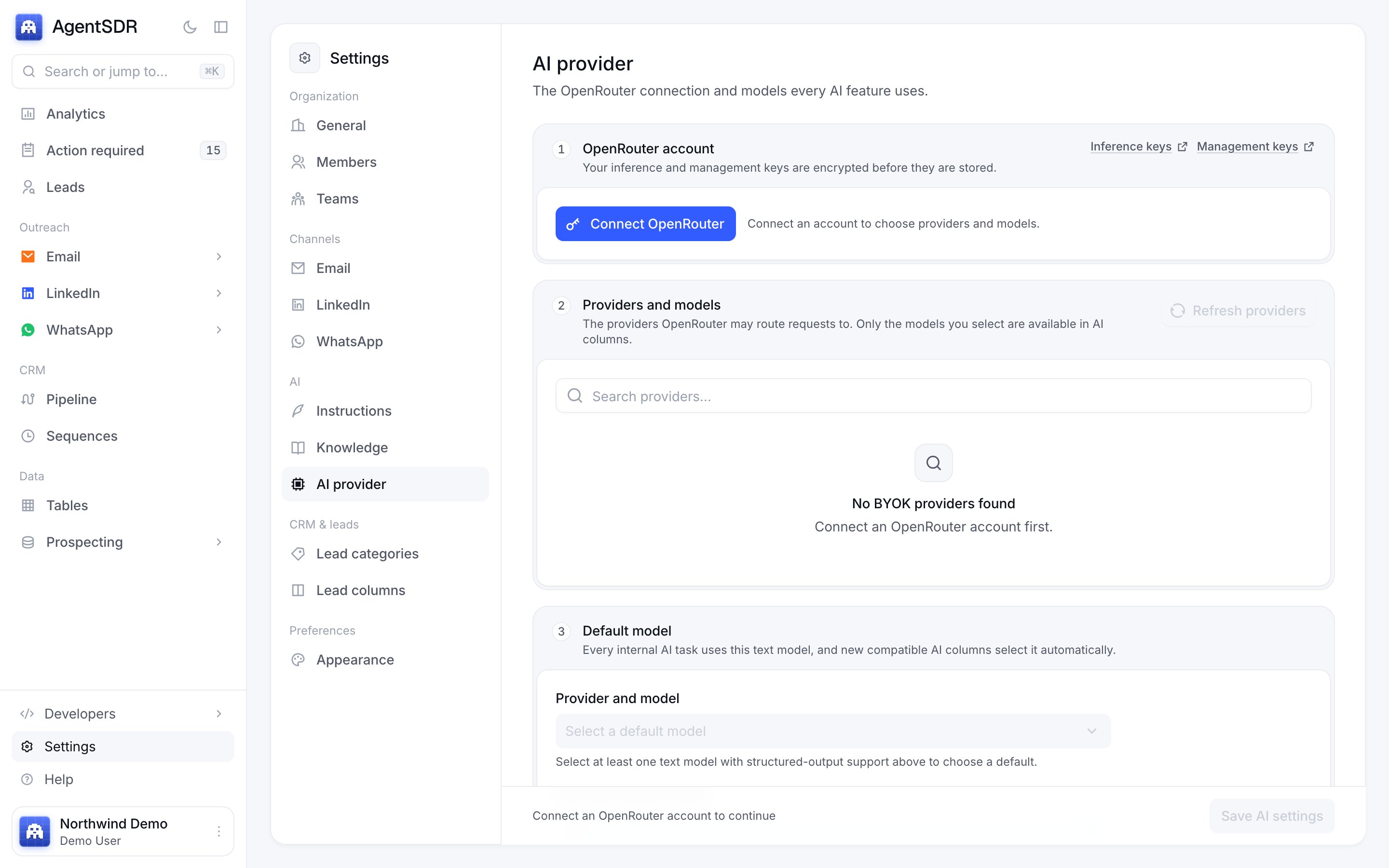
Go to Settings, then AI provider. Connect OpenRouter with an inference key and a management key, pick the providers and models you want, choose a default model and confirm that shared capacity is never used. Until you save this, AI features such as reply classification and drafts cannot run. The full walkthrough is in AI provider.
Settings, AI provider is where you connect OpenRouter.
3
Connect a channel
Each channel has its own set of tabs under Settings, and its service is connected on the tab for it. A feature switches on only once its service is connected.
Email. On Email, open the Connection tab and connect your Google Workspace service account. Then open Mailboxes and choose Add mailbox. See Connect email.
LinkedIn. On LinkedIn, open Connection and connect Unipile, then link an account on the Accounts tab. See LinkedIn accounts.
WhatsApp. On WhatsApp, open Integrations and connect Unipile (and Cloudflare R2 if you will record calls), then choose Sync from Unipile on the Numbers tab. See WhatsApp accounts.
Open Leads and choose Import people. Pick an .xlsx, .xls or .csv file; you can start from Download Excel template. Columns beyond the basics become merge fields you can use in messages. See Import leads.
5
Launch a first campaign
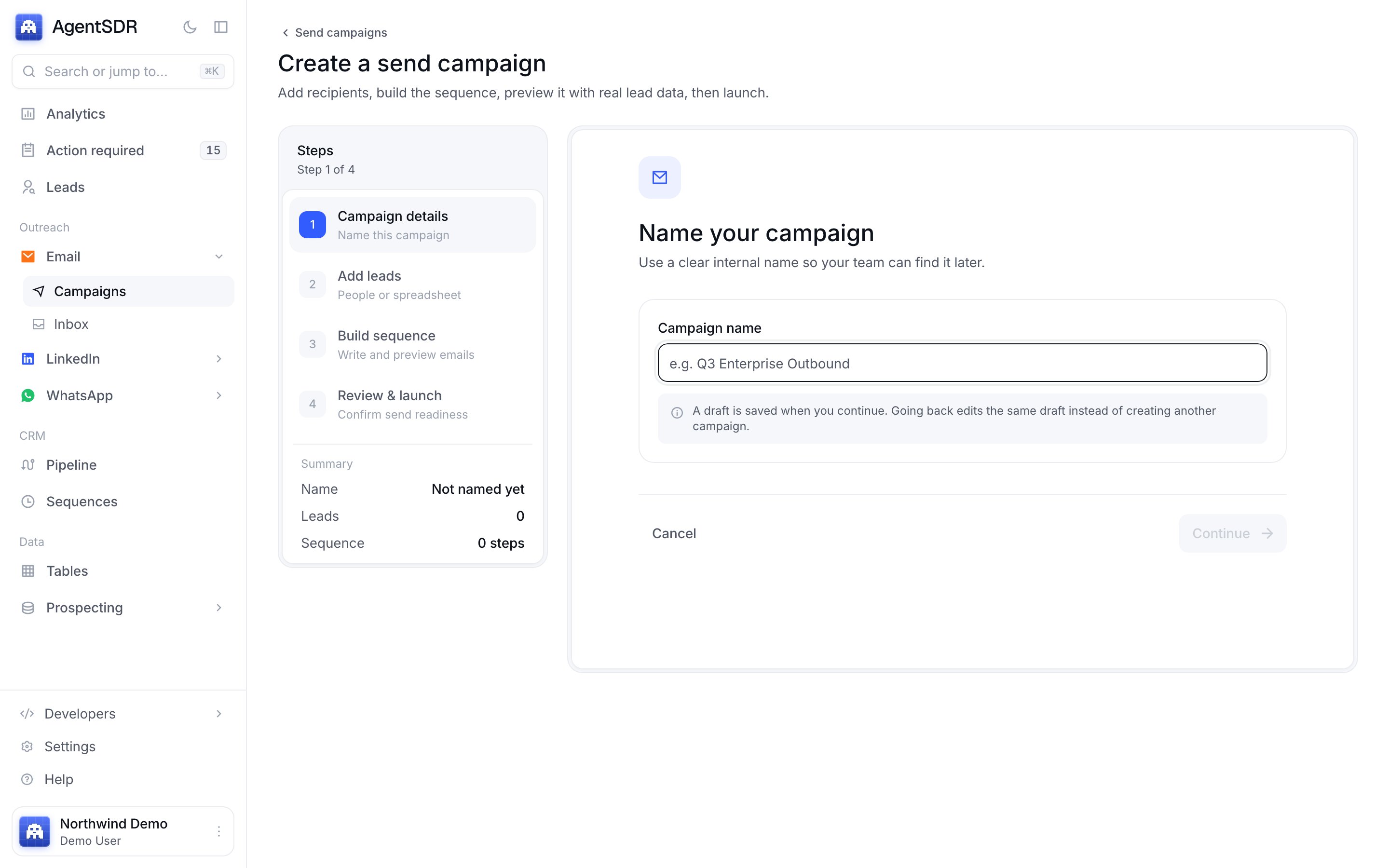
Under Outreach, open Email, then Campaigns, and choose Create campaign. The wizard has four steps: Campaign details, Add leads, Build sequence and Review & launch.
The four-step campaign wizard.
Launch campaign stays disabled until the campaign has a connected mailbox, a complete sequence and at least one lead. You can also choose Save as draft and come back. See Email campaigns.
Start with a small list. New mailboxes send 30 emails a day by default, spaced by a random gap, inside weekday sending hours. See Sending rules.
6
Work the replies
When someone replies, the message lands in Action required in the sidebar, together with the AI’s classification and a draft answer. Review the draft, edit it if you want, and send it. Replies are also visible in the channel’s own inbox: Email, Inbox; LinkedIn, Messages; WhatsApp, Messages.Analytics then shows replies, positive replies, meetings and customers for the period. See Action required and Analytics.
The mental model behind organizations, leads and channels.
Self-hosting
Install, configure and upgrade your instance.
Responsible use
Keep your accounts healthy and your outreach lawful.
{"docsConfig":{"theme":"mint","$schema":"https://mintlify.com/docs.json","name":"ReachCrew","description":"The open-source AI SDR: find leads, reach them on email, LinkedIn and WhatsApp, and let AI work every reply, from one workspace you run yourself.","colors":{"primary":"#335cff","light":"#5b7bff","dark":"#1f3bad"},"logo":{"light":"https://mintcdn.com/recahcrew/b3LOEBKCy3btecGb/assets/logo-light.svg?fit=max\u0026auto=format\u0026n=b3LOEBKCy3btecGb\u0026q=85\u0026s=5f8cfd64a1c15e42c96a309144aac39a","dark":"https://mintcdn.com/recahcrew/b3LOEBKCy3btecGb/assets/logo-dark.svg?fit=max\u0026auto=format\u0026n=b3LOEBKCy3btecGb\u0026q=85\u0026s=c8de838080aa865de4a2aecef52e8077","href":"https://reachcrew.ai"},"favicon":"https://mintcdn.com/recahcrew/b3LOEBKCy3btecGb/assets/logo.svg?fit=max\u0026auto=format\u0026n=b3LOEBKCy3btecGb\u0026q=85\u0026s=850db680a389217504579943797affd4","navbar":{"links":[{"href":"/help","label":"Get help"},{"href":"https://reachcrew.ai","label":"Website"}],"primary":{"type":"github","href":"https://github.com/rishav887/reachcrew"}},"footer":{"socials":{"github":"https://github.com/rishav887/reachcrew","website":"https://reachcrew.ai"},"links":[{"header":"Community","items":[{"label":"Ask a question","href":"https://github.com/rishav887/reachcrew/discussions"},{"label":"Report a bug","href":"https://github.com/rishav887/reachcrew/issues/new?template=bug_report.yml"},{"label":"Request a feature","href":"https://github.com/rishav887/reachcrew/issues/new?template=feature_request.yml"},{"label":"Report a security issue","href":"https://github.com/rishav887/reachcrew/security/advisories/new"}]},{"header":"Project","items":[{"label":"GitHub","href":"https://github.com/rishav887/reachcrew"},{"label":"Changelog","href":"https://github.com/rishav887/reachcrew/blob/main/CHANGELOG.md"},{"label":"Contributing","href":"https://github.com/rishav887/reachcrew/blob/main/CONTRIBUTING.md"},{"label":"License (MIT)","href":"https://github.com/rishav887/reachcrew/blob/main/LICENSE"}]}]},"icons":{"library":"lucide"},"contextual":{"options":["copy","view","chatgpt","claude"],"display":"header"},"navigation":{"pages":[]}},"deployment":{"deploymentMetadataValue":{"subdomain":"recahcrew","hasAudioNarration":false,"actualSubdomain":"recahcrew","customDomains":[],"gitSource":{"type":"github","owner":"rishav887","repo":"linkedin-outreach-platform","deployBranch":"main","contentDirectory":"docs","isPrivate":true,"mountPath":"","label":"","_id":"6af6f68f902237199e0ed1f3"},"entitlements":{"AI_CHAT":{"status":"ENABLED"},"WEB_MCP":{"status":"ENABLED"},"NARRATION":{"status":"ENABLED"}},"buildId":"6af6f6ac902237199e0ed38d","clientVersion":"0.0.4124","searchFilterCounts":[{"language":"default","tag":"Guides","count":29},{"language":"default","tag":"Self-hosting","count":29},{"language":"default","tag":"Integrations","count":9},{"language":"default","tag":"AI CRM","count":5},{"language":"default","tag":"Developers","count":4},{"language":"default","tag":"Get started","count":4},{"language":"default","tag":"Email","count":3},{"language":"default","tag":"Leads","count":3},{"language":"default","tag":"LinkedIn","count":3},{"language":"default","tag":"Tables","count":3}]},"assistantConfig":{"enableAskAiButton":false,"enableStarterQuestions":false,"enableContextualStarterQuestions":false,"enableAskAiSearchBar":true},"basePath":"","hasChatPermissions":true,"hasWebMcpPermissions":true,"toggles":[{"name":"kill-isr","enabled":true,"variant":{"name":"disabled","enabled":false,"feature_enabled":true},"impressionData":false},{"name":"custom-rbac-roles","enabled":true,"variant":{"name":"disabled","enabled":false,"feature_enabled":true},"impressionData":false},{"name":"agent-mintlify-slack","enabled":true,"variant":{"name":"disabled","enabled":false,"feature_enabled":true},"impressionData":false},{"name":"agent-integrations-settings","enabled":true,"variant":{"name":"disabled","enabled":false,"feature_enabled":true},"impressionData":false},{"name":"rbac-expansion","enabled":true,"variant":{"name":"disabled","enabled":false,"feature_enabled":true},"impressionData":false},{"name":"automations-pr-grouping","enabled":true,"variant":{"name":"disabled","enabled":false,"feature_enabled":true},"impressionData":false},{"name":"custom-prefix","enabled":true,"variant":{"name":"disabled","enabled":false,"feature_enabled":true},"impressionData":false},{"name":"analytics-v7","enabled":true,"variant":{"name":"disabled","enabled":false,"feature_enabled":true},"impressionData":false},{"name":"user-flows-analytics","enabled":true,"variant":{"name":"disabled","enabled":false,"feature_enabled":true},"impressionData":false},{"name":"no-publish-flow","enabled":true,"variant":{"name":"disabled","enabled":false,"feature_enabled":true},"impressionData":false},{"name":"workos-onboarding","enabled":true,"variant":{"name":"disabled","enabled":false,"feature_enabled":true},"impressionData":false},{"name":"snapshot-serving-live","enabled":true,"variant":{"name":"disabled","enabled":false,"feature_enabled":true},"impressionData":false},{"name":"stripTemperatureMiddleware","enabled":true,"variant":{"name":"disabled","enabled":false,"feature_enabled":true},"impressionData":false},{"name":"support-platform-pylon-zendesk","enabled":true,"variant":{"name":"disabled","enabled":false,"feature_enabled":true},"impressionData":false},{"name":"snapshot-serving","enabled":true,"variant":{"name":"disabled","enabled":false,"feature_enabled":true},"impressionData":false},{"name":"instant-rollback","enabled":true,"variant":{"name":"disabled","enabled":false,"feature_enabled":true},"impressionData":false},{"name":"granular-notifications-server","enabled":true,"variant":{"name":"disabled","enabled":false,"feature_enabled":true},"impressionData":false},{"name":"granular-notifications","enabled":true,"variant":{"name":"disabled","enabled":false,"feature_enabled":true},"impressionData":false},{"name":"automations-fable","enabled":true,"variant":{"name":"disabled","enabled":false,"feature_enabled":true},"impressionData":false},{"name":"fixed-ai-action-pricing","enabled":true,"variant":{"name":"disabled","enabled":false,"feature_enabled":true},"impressionData":false},{"name":"automation-resolve-merge-conflict","enabled":true,"variant":{"name":"disabled","enabled":false,"feature_enabled":true},"impressionData":false},{"name":"scoped-publishing","enabled":true,"variant":{"name":"disabled","enabled":false,"feature_enabled":true},"impressionData":false},{"name":"mintql","enabled":true,"variant":{"name":"disabled","enabled":false,"feature_enabled":true},"impressionData":false},{"name":"page-level-analytics","enabled":true,"variant":{"name":"disabled","enabled":false,"feature_enabled":true},"impressionData":false},{"name":"editor-version-history-v2","enabled":true,"variant":{"name":"disabled","enabled":false,"feature_enabled":true},"impressionData":false},{"name":"billing-page-v2","enabled":true,"variant":{"name":"disabled","enabled":false,"feature_enabled":true},"impressionData":false},{"name":"full-page-search","enabled":true,"variant":{"name":"disabled","enabled":false,"feature_enabled":true},"impressionData":false},{"name":"workspace-projects","enabled":true,"variant":{"name":"disabled","enabled":false,"feature_enabled":true},"impressionData":false},{"name":"assistant-v5","enabled":true,"variant":{"name":"disabled","enabled":false,"feature_enabled":true},"impressionData":false},{"name":"fork-pr-previews","enabled":true,"variant":{"name":"disabled","enabled":false,"feature_enabled":true},"impressionData":false},{"name":"revalidation-jwt","enabled":true,"variant":{"name":"disabled","enabled":false,"feature_enabled":true},"impressionData":false},{"name":"workos-sso-scim","enabled":true,"variant":{"name":"disabled","enabled":false,"feature_enabled":true},"impressionData":false},{"name":"hobby-abuse-scan","enabled":true,"variant":{"name":"disabled","enabled":false,"feature_enabled":true},"impressionData":false},{"name":"dashboard-inbox","enabled":true,"variant":{"name":"disabled","enabled":false,"feature_enabled":true},"impressionData":false},{"name":"workos-signup","enabled":true,"variant":{"name":"disabled","enabled":false,"feature_enabled":true},"impressionData":false},{"name":"turbopuffer-dual-write","enabled":true,"variant":{"name":"disabled","enabled":false,"feature_enabled":true},"impressionData":false},{"name":"workos-enabled","enabled":true,"variant":{"name":"disabled","enabled":false,"feature_enabled":true},"impressionData":false},{"name":"approve-review-flow","enabled":true,"variant":{"name":"disabled","enabled":false,"feature_enabled":true},"impressionData":false},{"name":"editor-metadata","enabled":true,"variant":{"name":"disabled","enabled":false,"feature_enabled":true},"impressionData":false},{"name":"sso-setup-deadline-banner","enabled":true,"variant":{"name":"disabled","enabled":false,"feature_enabled":true},"impressionData":false},{"name":"turbopuffer-serve","enabled":true,"variant":{"name":"disabled","enabled":false,"feature_enabled":true},"impressionData":false},{"name":"live-agents","enabled":true,"variant":{"name":"disabled","enabled":false,"feature_enabled":true},"impressionData":false},{"name":"llms-txt-v2","enabled":true,"variant":{"name":"disabled","enabled":false,"feature_enabled":true},"impressionData":false}],"googleFontsInlined":false},"customCss":[],"page":{"pagePath":"quickstart","slug":"/quickstart","pageMetadata":{"title":"Quickstart","description":"Go from a running ReachCrew instance to your first campaign and your first reply in the queue.","icon":"rocket","href":"/quickstart"},"description":{"compiledSource":"\"use strict\";\nconst {jsx: _jsx} = arguments[0];\nconst {useMDXComponents: _provideComponents} = arguments[0];\nfunction _createMdxContent(props) {\n const _components = {\n p: \"p\",\n ..._provideComponents(),\n ...props.components\n };\n return _jsx(_components.p, {\n children: \"Go from a running ReachCrew instance to your first campaign and your first reply in the queue.\"\n });\n}\nfunction MDXContent(props = {}) {\n const {wrapper: MDXLayout} = {\n ..._provideComponents(),\n ...props.components\n };\n return MDXLayout ? _jsx(MDXLayout, {\n ...props,\n children: _jsx(_createMdxContent, {\n ...props\n })\n }) : _createMdxContent(props);\n}\nreturn {\n default: MDXContent\n};\n","frontmatter":{},"scope":{}},"pageType":"default","mdx":{"mdxSource":{"compiledSource":"\"use strict\";const{Fragment:_Fragment,jsx:_jsx,jsxs:_jsxs}=arguments[0];const{useMDXComponents:_provideComponents}=arguments[0];function _createMdxContent(props){const _components={a:`a`,code:`code`,li:`li`,p:`p`,strong:`strong`,ul:`ul`,..._provideComponents(),...props.components},{Card,CardGroup,Frame,Heading,Info,OptimizedImage,Step,Steps,Tip}=_components;if(!Card)_missingMdxReference(`Card`,true);if(!CardGroup)_missingMdxReference(`CardGroup`,true);if(!Frame)_missingMdxReference(`Frame`,true);if(!Heading)_missingMdxReference(`Heading`,true);if(!Info)_missingMdxReference(`Info`,true);if(!OptimizedImage)_missingMdxReference(`OptimizedImage`,true);if(!Step)_missingMdxReference(`Step`,true);if(!Steps)_missingMdxReference(`Steps`,true);if(!Tip)_missingMdxReference(`Tip`,true);return _jsxs(_Fragment,{children:[_jsxs(_components.p,{children:[`This page assumes ReachCrew is already running and you can open it in a browser. If not, start with `,_jsx(_components.a,{href:`/self-hosting`,children:`Self-hosting`}),`. You will create your organization, connect a channel and the AI provider, import leads and launch a first email campaign.`]}),`\n`,_jsxs(Steps,{children:[_jsxs(Step,{title:`Create your account and organization`,children:[_jsxs(_components.p,{children:[`On a fresh instance, the first visit opens the `,_jsx(_components.strong,{children:`Set up ReachCrew`}),` page. Enter `,_jsx(_components.strong,{children:`Your name`}),`, `,_jsx(_components.strong,{children:`Organization name`}),`, `,_jsx(_components.strong,{children:`Email`}),` and `,_jsx(_components.strong,{children:`Password`}),`, then choose `,_jsx(_components.strong,{children:`Create admin account`}),`. You become the organization’s owner, are signed in and land on Analytics. No confirmation email is needed for this first account.`]}),_jsx(Info,{children:_jsxs(_components.p,{children:[`By default an instance is invite-only: everyone after the first account needs an invitation from an existing organization. Invited people confirm their email address, so set up `,_jsx(_components.a,{href:`/integrations/resend`,children:`Resend`}),` before inviting anyone. See `,_jsx(_components.a,{href:`/workspace/organizations`,children:`Organizations and members`}),`.`]})})]}),_jsxs(Step,{title:`Connect your AI provider`,children:[_jsxs(_components.p,{children:[`Go to `,_jsx(_components.strong,{children:`Settings`}),`, then `,_jsx(_components.strong,{children:`AI provider`}),`. Connect OpenRouter with an inference key and a management key, pick the providers and models you want, choose a default model and confirm that shared capacity is never used. Until you save this, AI features such as reply classification and drafts cannot run. The full walkthrough is in `,_jsx(_components.a,{href:`/workspace/ai-provider`,children:`AI provider`}),`.`]}),_jsx(Frame,{caption:`Settings, AI provider is where you connect OpenRouter.`,children:_jsx(OptimizedImage,{src:`https://mintcdn.com/recahcrew/b3LOEBKCy3btecGb/assets/screenshots/app/ai-provider.png?fit=max\u0026auto=format\u0026n=b3LOEBKCy3btecGb\u0026q=85\u0026s=1b5256cf1378eb208160fce39af2c073`,alt:`Settings, AI provider page with numbered sections for the OpenRouter account, providers and models, and the default model, and a Connect OpenRouter button`,\"data-og-width\":`2880`,width:`2880`,\"data-og-height\":`1800`,height:`1800`,\"data-path\":`assets/screenshots/app/ai-provider.png`,\"data-optimize\":`true`,\"data-opv\":`3`,srcset:`https://mintcdn.com/recahcrew/b3LOEBKCy3btecGb/assets/screenshots/app/ai-provider.png?w=280\u0026fit=max\u0026auto=format\u0026n=b3LOEBKCy3btecGb\u0026q=85\u0026s=93362448665e9340a6e2cd8247f28f08 280w, https://mintcdn.com/recahcrew/b3LOEBKCy3btecGb/assets/screenshots/app/ai-provider.png?w=560\u0026fit=max\u0026auto=format\u0026n=b3LOEBKCy3btecGb\u0026q=85\u0026s=3289f23574a9fc838f9f9ab55fe38a64 560w, https://mintcdn.com/recahcrew/b3LOEBKCy3btecGb/assets/screenshots/app/ai-provider.png?w=840\u0026fit=max\u0026auto=format\u0026n=b3LOEBKCy3btecGb\u0026q=85\u0026s=80c697a726fa165d0f282981136bbe23 840w, https://mintcdn.com/recahcrew/b3LOEBKCy3btecGb/assets/screenshots/app/ai-provider.png?w=1100\u0026fit=max\u0026auto=format\u0026n=b3LOEBKCy3btecGb\u0026q=85\u0026s=985d149aab890fbd972770151935ac05 1100w, https://mintcdn.com/recahcrew/b3LOEBKCy3btecGb/assets/screenshots/app/ai-provider.png?w=1650\u0026fit=max\u0026auto=format\u0026n=b3LOEBKCy3btecGb\u0026q=85\u0026s=d1da50c37c084f64ee3da8b30b0a4c57 1650w, https://mintcdn.com/recahcrew/b3LOEBKCy3btecGb/assets/screenshots/app/ai-provider.png?w=2500\u0026fit=max\u0026auto=format\u0026n=b3LOEBKCy3btecGb\u0026q=85\u0026s=fc9ea624928967c1cd79df834e2f0d49 2500w`})})]}),_jsxs(Step,{title:`Connect a channel`,children:[_jsxs(_components.p,{children:[`Each channel has its own set of tabs under `,_jsx(_components.strong,{children:`Settings`}),`, and its service is connected on the tab for it. A feature switches on only once its service is connected.`]}),_jsxs(_components.ul,{children:[`\n`,_jsxs(_components.li,{children:[_jsx(_components.strong,{children:`Email.`}),` On `,_jsx(_components.strong,{children:`Email`}),`, open the `,_jsx(_components.strong,{children:`Connection`}),` tab and connect your Google Workspace service account. Then open `,_jsx(_components.strong,{children:`Mailboxes`}),` and choose `,_jsx(_components.strong,{children:`Add mailbox`}),`. See `,_jsx(_components.a,{href:`/email/connect`,children:`Connect email`}),`.`]}),`\n`,_jsxs(_components.li,{children:[_jsx(_components.strong,{children:`LinkedIn.`}),` On `,_jsx(_components.strong,{children:`LinkedIn`}),`, open `,_jsx(_components.strong,{children:`Connection`}),` and connect Unipile, then link an account on the `,_jsx(_components.strong,{children:`Accounts`}),` tab. See `,_jsx(_components.a,{href:`/linkedin/accounts`,children:`LinkedIn accounts`}),`.`]}),`\n`,_jsxs(_components.li,{children:[_jsx(_components.strong,{children:`WhatsApp.`}),` On `,_jsx(_components.strong,{children:`WhatsApp`}),`, open `,_jsx(_components.strong,{children:`Integrations`}),` and connect Unipile (and Cloudflare R2 if you will record calls), then choose `,_jsx(_components.strong,{children:`Sync from Unipile`}),` on the `,_jsx(_components.strong,{children:`Numbers`}),` tab. See `,_jsx(_components.a,{href:`/whatsapp/accounts`,children:`WhatsApp accounts`}),`.`]}),`\n`]}),_jsxs(_components.p,{children:[`Credentials for each service are in `,_jsx(_components.a,{href:`/integrations`,children:`Integrations`}),`.`]})]}),_jsx(Step,{title:`Import your leads`,children:_jsxs(_components.p,{children:[`Open `,_jsx(_components.strong,{children:`Leads`}),` and choose `,_jsx(_components.strong,{children:`Import people`}),`. Pick an `,_jsx(_components.code,{children:`.xlsx`}),`, `,_jsx(_components.code,{children:`.xls`}),` or `,_jsx(_components.code,{children:`.csv`}),` file; you can start from `,_jsx(_components.strong,{children:`Download Excel template`}),`. Columns beyond the basics become merge fields you can use in messages. See `,_jsx(_components.a,{href:`/leads/import`,children:`Import leads`}),`.`]})}),_jsxs(Step,{title:`Launch a first campaign`,children:[_jsxs(_components.p,{children:[`Under `,_jsx(_components.strong,{children:`Outreach`}),`, open `,_jsx(_components.strong,{children:`Email`}),`, then `,_jsx(_components.strong,{children:`Campaigns`}),`, and choose `,_jsx(_components.strong,{children:`Create campaign`}),`. The wizard has four steps: `,_jsx(_components.strong,{children:`Campaign details`}),`, `,_jsx(_components.strong,{children:`Add leads`}),`, `,_jsx(_components.strong,{children:`Build sequence`}),` and `,_jsx(_components.strong,{children:`Review \u0026 launch`}),`.`]}),_jsx(Frame,{caption:`The four-step campaign wizard.`,children:_jsx(OptimizedImage,{src:`https://mintcdn.com/recahcrew/b3LOEBKCy3btecGb/assets/screenshots/app/email-campaign-new.png?fit=max\u0026auto=format\u0026n=b3LOEBKCy3btecGb\u0026q=85\u0026s=969c168860f1b2fef526045e2e8db555`,alt:`The Create a send campaign wizard on step 1 of 4, Campaign details, asking for a campaign name`,\"data-og-width\":`2880`,width:`2880`,\"data-og-height\":`1800`,height:`1800`,\"data-path\":`assets/screenshots/app/email-campaign-new.png`,\"data-optimize\":`true`,\"data-opv\":`3`,srcset:`https://mintcdn.com/recahcrew/b3LOEBKCy3btecGb/assets/screenshots/app/email-campaign-new.png?w=280\u0026fit=max\u0026auto=format\u0026n=b3LOEBKCy3btecGb\u0026q=85\u0026s=f822c6e5c5b9eab7e1b4e7990ae6da22 280w, https://mintcdn.com/recahcrew/b3LOEBKCy3btecGb/assets/screenshots/app/email-campaign-new.png?w=560\u0026fit=max\u0026auto=format\u0026n=b3LOEBKCy3btecGb\u0026q=85\u0026s=ed6911cc6ff87d4657f524c28dd2fcf1 560w, https://mintcdn.com/recahcrew/b3LOEBKCy3btecGb/assets/screenshots/app/email-campaign-new.png?w=840\u0026fit=max\u0026auto=format\u0026n=b3LOEBKCy3btecGb\u0026q=85\u0026s=2d8f483df513214922a235897abae3ee 840w, https://mintcdn.com/recahcrew/b3LOEBKCy3btecGb/assets/screenshots/app/email-campaign-new.png?w=1100\u0026fit=max\u0026auto=format\u0026n=b3LOEBKCy3btecGb\u0026q=85\u0026s=b54e237ef1734ae7dc524d494421f2ed 1100w, https://mintcdn.com/recahcrew/b3LOEBKCy3btecGb/assets/screenshots/app/email-campaign-new.png?w=1650\u0026fit=max\u0026auto=format\u0026n=b3LOEBKCy3btecGb\u0026q=85\u0026s=5ee04d2889ea1f82c9e618d113335e35 1650w, https://mintcdn.com/recahcrew/b3LOEBKCy3btecGb/assets/screenshots/app/email-campaign-new.png?w=2500\u0026fit=max\u0026auto=format\u0026n=b3LOEBKCy3btecGb\u0026q=85\u0026s=4cc8903eddca62fa6f28b8bde2801afd 2500w`})}),_jsxs(_components.p,{children:[_jsx(_components.strong,{children:`Launch campaign`}),` stays disabled until the campaign has a connected mailbox, a complete sequence and at least one lead. You can also choose `,_jsx(_components.strong,{children:`Save as draft`}),` and come back. See `,_jsx(_components.a,{href:`/email/campaigns`,children:`Email campaigns`}),`.`]}),_jsx(Tip,{children:_jsxs(_components.p,{children:[`Start with a small list. New mailboxes send 30 emails a day by default, spaced by a random gap, inside weekday sending hours. See `,_jsx(_components.a,{href:`/workspace/sending-rules`,children:`Sending rules`}),`.`]})})]}),_jsxs(Step,{title:`Work the replies`,children:[_jsxs(_components.p,{children:[`When someone replies, the message lands in `,_jsx(_components.strong,{children:`Action required`}),` in the sidebar, together with the AI’s classification and a draft answer. Review the draft, edit it if you want, and send it. Replies are also visible in the channel’s own inbox: `,_jsx(_components.strong,{children:`Email`}),`, `,_jsx(_components.strong,{children:`Inbox`}),`; `,_jsx(_components.strong,{children:`LinkedIn`}),`, `,_jsx(_components.strong,{children:`Messages`}),`; `,_jsx(_components.strong,{children:`WhatsApp`}),`, `,_jsx(_components.strong,{children:`Messages`}),`.`]}),_jsxs(_components.p,{children:[_jsx(_components.strong,{children:`Analytics`}),` then shows replies, positive replies, meetings and customers for the period. See `,_jsx(_components.a,{href:`/crm/action-required`,children:`Action required`}),` and `,_jsx(_components.a,{href:`/analytics`,children:`Analytics`}),`.`]})]})]}),`\n`,_jsx(Heading,{level:`2`,id:`related`,children:`Related`}),`\n`,_jsxs(CardGroup,{cols:2,children:[_jsx(Card,{title:`Concepts`,icon:`lightbulb`,href:`/concepts`,children:_jsx(_components.p,{children:`The mental model behind organizations, leads and channels.`})}),_jsx(Card,{title:`Self-hosting`,icon:`server`,href:`/self-hosting`,children:_jsx(_components.p,{children:`Install, configure and upgrade your instance.`})}),_jsx(Card,{title:`Responsible use`,icon:`shield-check`,href:`/responsible-use`,children:_jsx(_components.p,{children:`Keep your accounts healthy and your outreach lawful.`})})]})]})}function MDXContent(props={}){const{wrapper:MDXLayout}={..._provideComponents(),...props.components};return MDXLayout?_jsx(MDXLayout,{...props,children:_jsx(_createMdxContent,{...props})}):_createMdxContent(props)}return{default:MDXContent};function _missingMdxReference(id,component){throw new Error(`Expected `+(component?`component`:`object`)+\" `\"+id+\"` to be defined: you likely forgot to import, pass, or provide it.\")}","frontmatter":{},"scope":{"config":{},"pageMetadata":{"title":"Quickstart","description":"Go from a running ReachCrew instance to your first campaign and your first reply in the queue.","icon":"rocket","href":"/quickstart"}}},"mdxSourceWithNoJs":null},"mdxExtracts":{"tableOfContents":[{"title":"Related","slug":"related","depth":2,"children":[]}],"codeExamples":{}},"jsLinks":[],"subdomain":"recahcrew","siteName":"ReachCrew","title":"Quickstart - ReachCrew","navMaps":{"firstHrefInVersion":{},"firstHrefInLanguage":{}},"lastModified":"2026-11-13T11:38:39.015Z","originalFileLocation":"quickstart.mdx"},"headHtml":"\u003cscript data-mint-head>(function(){var d=document.documentElement,p=null;if(!p){try{p=localStorage.getItem(\"isDarkMode\")}catch(e){}if(p==='true')p='dark';else if(p==='false')p='light';if(p!=='light'\u0026\u0026p!=='dark'\u0026\u0026p!=='system')p=\"system\"}var r=p==='system'?(matchMedia(\"(prefers-color-scheme: dark)\").matches?'dark':'light'):p;d.classList.remove(r==='dark'?'light':'dark');d.classList.add(r);d.setAttribute(\"data-theme-preference\",p)})();\u003c/script>\u003cmeta data-mint-head name=\"description\" content=\"Go from a running ReachCrew instance to your first campaign and your first reply in the queue.\">\u003cmeta data-mint-head name=\"application-name\" content=\"ReachCrew\">\u003cmeta data-mint-head name=\"generator\" content=\"Mintlify\">\u003clink data-mint-head rel=\"icon\" type=\"image/png\" sizes=\"192x192\" href=\"/mintlify-assets/_mintlify/favicons/recahcrew/PDKJgs23Hy0bUg-G/_generated/favicon/android-chrome-192x192.png\" media=\"(prefers-color-scheme: light)\">\u003clink data-mint-head rel=\"apple-touch-icon\" type=\"image/png\" sizes=\"180x180\" href=\"/mintlify-assets/_mintlify/favicons/recahcrew/PDKJgs23Hy0bUg-G/_generated/favicon/apple-touch-icon.png\">\u003clink data-mint-head rel=\"icon\" type=\"image/png\" sizes=\"16x16\" href=\"/mintlify-assets/_mintlify/favicons/recahcrew/PDKJgs23Hy0bUg-G/_generated/favicon/favicon-16x16.png\" media=\"(prefers-color-scheme: light)\">\u003clink data-mint-head rel=\"icon\" type=\"image/png\" sizes=\"32x32\" href=\"/mintlify-assets/_mintlify/favicons/recahcrew/PDKJgs23Hy0bUg-G/_generated/favicon/favicon-32x32.png\" media=\"(prefers-color-scheme: light)\">\u003clink data-mint-head rel=\"shortcut icon\" type=\"image/x-icon\" href=\"/mintlify-assets/_mintlify/favicons/recahcrew/PDKJgs23Hy0bUg-G/_generated/favicon/favicon.ico\" media=\"(prefers-color-scheme: light)\">\u003clink data-mint-head rel=\"icon\" type=\"image/png\" sizes=\"192x192\" href=\"/mintlify-assets/_mintlify/favicons/recahcrew/PDKJgs23Hy0bUg-G/_generated/favicon-dark/android-chrome-192x192.png\" media=\"(prefers-color-scheme: dark)\">\u003clink data-mint-head rel=\"icon\" type=\"image/png\" sizes=\"16x16\" href=\"/mintlify-assets/_mintlify/favicons/recahcrew/PDKJgs23Hy0bUg-G/_generated/favicon-dark/favicon-16x16.png\" media=\"(prefers-color-scheme: dark)\">\u003clink data-mint-head rel=\"icon\" type=\"image/png\" sizes=\"32x32\" href=\"/mintlify-assets/_mintlify/favicons/recahcrew/PDKJgs23Hy0bUg-G/_generated/favicon-dark/favicon-32x32.png\" media=\"(prefers-color-scheme: dark)\">\u003clink data-mint-head rel=\"shortcut icon\" type=\"image/x-icon\" href=\"/mintlify-assets/_mintlify/favicons/recahcrew/PDKJgs23Hy0bUg-G/_generated/favicon-dark/favicon.ico\" media=\"(prefers-color-scheme: dark)\">\u003cmeta data-mint-head property=\"og:title\" content=\"Quickstart - ReachCrew\">\u003cmeta data-mint-head property=\"og:description\" content=\"Go from a running ReachCrew instance to your first campaign and your first reply in the queue.\">\u003cmeta data-mint-head property=\"og:site_name\" content=\"ReachCrew\">\u003cmeta data-mint-head property=\"og:url\" content=\"https://recahcrew.mintlify.app/quickstart\">\u003cmeta data-mint-head property=\"og:type\" content=\"website\">\u003cmeta data-mint-head property=\"og:image\" content=\"https://recahcrew.mintlify.site/_mintlify/api/og/v2?division=Get+started\u0026amp;title=Quickstart\u0026amp;description=Go+from+a+running+ReachCrew+instance+to+your+first+campaign+and+your+first+reply+in+the+queue.\u0026amp;theme=2714b6d21ebe045728904557\u0026amp;signature=cf0e46158fa5d4e255acf5cc2a96e80a2ac15dae74b14318d8441b2440d224a5\">\u003cmeta data-mint-head property=\"og:image:width\" content=\"1200\">\u003cmeta data-mint-head property=\"og:image:height\" content=\"630\">\u003cmeta data-mint-head name=\"twitter:card\" content=\"summary_large_image\">\u003cmeta data-mint-head name=\"twitter:title\" content=\"Quickstart - ReachCrew\">\u003cmeta data-mint-head name=\"twitter:description\" content=\"Go from a running ReachCrew instance to your first campaign and your first reply in the queue.\">\u003cmeta data-mint-head name=\"twitter:image\" content=\"https://recahcrew.mintlify.site/_mintlify/api/og/v2?division=Get+started\u0026amp;title=Quickstart\u0026amp;description=Go+from+a+running+ReachCrew+instance+to+your+first+campaign+and+your+first+reply+in+the+queue.\u0026amp;theme=2714b6d21ebe045728904557\u0026amp;signature=cf0e46158fa5d4e255acf5cc2a96e80a2ac15dae74b14318d8441b2440d224a5\">\u003cmeta data-mint-head name=\"twitter:image:width\" content=\"1200\">\u003cmeta data-mint-head name=\"twitter:image:height\" content=\"630\">\u003cmeta data-mint-head name=\"msapplication-config\" content=\"/mintlify-assets/_mintlify/favicons/recahcrew/PDKJgs23Hy0bUg-G/_generated/favicon/browserconfig.xml\">\u003cmeta data-mint-head name=\"apple-mobile-web-app-title\" content=\"ReachCrew\">\u003cmeta data-mint-head name=\"msapplication-TileColor\" content=\"#335cff\">\u003clink data-mint-head rel=\"canonical\" href=\"https://recahcrew.mintlify.app/quickstart\">\u003clink data-mint-head rel=\"alternate\" type=\"application/xml\" href=\"/sitemap.xml\">\u003clink data-mint-head rel=\"alternate\" type=\"text/markdown\" href=\"/quickstart.md\">\u003cscript data-mint-head type=\"application/ld+json\">{\"@context\":\"https://schema.org\",\"@graph\":[{\"@type\":\"Organization\",\"@id\":\"https://recahcrew.mintlify.app/#organization\",\"name\":\"ReachCrew\",\"url\":\"https://recahcrew.mintlify.app\",\"logo\":{\"@type\":\"ImageObject\",\"url\":\"https://mintcdn.com/recahcrew/b3LOEBKCy3btecGb/assets/logo-light.svg?fit=max\u0026auto=format\u0026n=b3LOEBKCy3btecGb\u0026q=85\u0026s=5f8cfd64a1c15e42c96a309144aac39a\"}},{\"@type\":\"WebSite\",\"@id\":\"https://recahcrew.mintlify.app#website\",\"name\":\"ReachCrew\",\"url\":\"https://recahcrew.mintlify.app\",\"publisher\":{\"@id\":\"https://recahcrew.mintlify.app/#organization\"}},{\"@type\":\"WebPage\",\"@id\":\"https://recahcrew.mintlify.app/quickstart#webpage\",\"url\":\"https://recahcrew.mintlify.app/quickstart\",\"name\":\"Quickstart\",\"description\":\"Go from a running ReachCrew instance to your first campaign and your first reply in the queue.\",\"dateModified\":\"2026-11-13T11:38:39.015Z\",\"isPartOf\":{\"@id\":\"https://recahcrew.mintlify.app#website\"},\"breadcrumb\":{\"@id\":\"https://recahcrew.mintlify.app/quickstart#breadcrumb\"}},{\"@type\":\"BreadcrumbList\",\"@id\":\"https://recahcrew.mintlify.app/quickstart#breadcrumb\",\"itemListElement\":[{\"@type\":\"ListItem\",\"position\":1,\"name\":\"Get started\",\"item\":\"https://recahcrew.mintlify.app\"},{\"@type\":\"ListItem\",\"position\":2,\"name\":\"Quickstart\",\"item\":\"https://recahcrew.mintlify.app/quickstart\"}]},{\"@type\":[\"Article\",\"TechArticle\"],\"@id\":\"https://recahcrew.mintlify.app/quickstart#article\",\"headline\":\"Quickstart\",\"name\":\"Quickstart\",\"description\":\"Go from a running ReachCrew instance to your first campaign and your first reply in the queue.\",\"url\":\"https://recahcrew.mintlify.app/quickstart\",\"mainEntityOfPage\":{\"@id\":\"https://recahcrew.mintlify.app/quickstart#webpage\"},\"dateModified\":\"2026-11-13T11:38:39.015Z\",\"publisher\":{\"@id\":\"https://recahcrew.mintlify.app/#organization\"},\"isPartOf\":{\"@id\":\"https://recahcrew.mintlify.app#website\"}}]}\u003c/script>\u003cscript data-mint-head type=\"application/ld+json\">{\"@context\":\"https://schema.org\",\"@type\":\"WebSite\",\"name\":\"ReachCrew\",\"publisher\":{\"@type\":\"Organization\",\"name\":\"ReachCrew\"},\"provider\":{\"@type\":\"Organization\",\"name\":\"Mintlify\",\"url\":\"https://mintlify.com\"}}\u003c/script>","agentPointerHref":"/quickstart.md","siteName":"ReachCrew","nav":{"global":null,"tabs":[{"tab":"Guides","groups":[{"group":"Get started","pages":[{"title":"Introduction","description":"ReachCrew is an open-source, self-hosted AI SDR: find leads, reach them on email, LinkedIn and WhatsApp, and work every reply from one place.","icon":"book-open","href":""},{"title":"Quickstart","icon":"rocket","href":"/quickstart"},{"title":"Concepts","description":"The mental model behind ReachCrew: organizations, one lead record, channels, campaigns, the reply queue and the rules that protect your accounts.","icon":"lightbulb","href":"/concepts"},{"title":"How ReachCrew works","icon":"workflow","href":"/how-it-works"}]},{"group":"Leads","pages":[{"title":"Leads","icon":"users","href":"/leads/overview"},{"title":"Import leads","icon":"upload","href":"/leads/import"},{"title":"Custom fields","icon":"columns-3","href":"/leads/custom-fields"}]},{"group":"Tables","pages":[{"title":"Tables","icon":"table","href":"/tables/overview"},{"title":"Enrichment providers","icon":"zap","href":"/tables/enrichment"},{"title":"AI and HTTP columns","icon":"sparkles","href":"/tables/ai-columns"}]},{"group":"Email","pages":[{"title":"Connect email","icon":"mail","href":"/email/connect"},{"title":"Email campaigns","icon":"send","href":"/email/campaigns"},{"title":"Email inbox","icon":"inbox","href":"/email/inbox"}]},{"group":"LinkedIn","pages":[{"title":"LinkedIn accounts","icon":"linkedin","href":"/linkedin/accounts"},{"title":"LinkedIn campaigns","icon":"linkedin","href":"/linkedin/campaigns"},{"title":"LinkedIn messages","icon":"message-circle","href":"/linkedin/messages"}]},{"group":"WhatsApp","pages":[{"title":"WhatsApp numbers","icon":"message-circle","href":"/whatsapp/accounts"},{"title":"Message campaigns","icon":"message-square","href":"/whatsapp/campaigns"},{"title":"Calling and recording","icon":"phone","href":"/whatsapp/calling"}]},{"group":"AI CRM","pages":[{"title":"CRM overview","icon":"kanban","href":"/crm/overview"},{"title":"Action required","icon":"inbox","href":"/crm/action-required"},{"title":"Pipeline","icon":"route","href":"/crm/pipeline"},{"title":"CRM sequences","icon":"list-checks","href":"/crm/sequences"},{"title":"Instructions, knowledge and lead categories","icon":"book-open","href":"/crm/knowledge"}]},{"group":"Analytics","pages":[{"title":"Analytics","icon":"chart-line","href":"/analytics"}]},{"group":"Workspace","pages":[{"title":"Organizations and members","icon":"users","href":"/workspace/organizations"},{"title":"AI provider","icon":"sparkles","href":"/workspace/ai-provider"},{"title":"Sending rules","icon":"settings","href":"/workspace/sending-rules"}]},{"group":"Help","pages":[{"title":"Get help","icon":"life-buoy","href":"/help"}]}]},{"tab":"Self-hosting","pages":[{"title":"Self-hosting","href":"/self-hosting"}]},{"tab":"Developers","pages":[{"title":"Developers","href":"/development"}]}]},"basePath":"","title":"Quickstart - ReachCrew","buildId":"dpl_8hoxaqFTU7hTr6A2fUraxAyjuiZo","deploymentId":"dpl_8hoxaqFTU7hTr6A2fUraxAyjuiZo","dynamics":["07c022d89b","a74be98ba7"],"chunks":["Frame-Dmj010Ph.js","DynamicMarkdown-GHvayGOn.js","zoom-image-lightbox-8gCTkA22.js","lightbox-handle-r17bVUz3.js"]}